Blog

  • Rearranging formulas and equations

    Download the PowerPoint here.

    This is a big one! It’s at a minimum 3 lessons, probably 4.

    Starts numerically
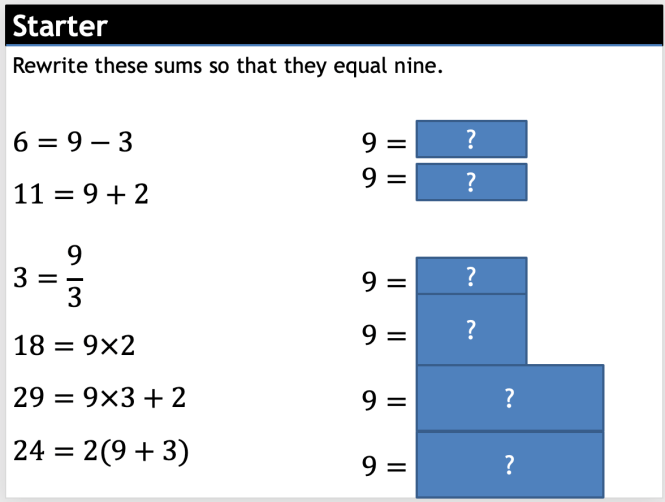
    I like this

    Next is something I have added after listening to the Mr Barton podcast with Naveen Rizvi. I realised I didn’t spend enough time talking about what the subject means!

    Some example problem pairs come next, and two activities. One on making sure that you can put the steps in the right order, one a simple grid of questions (although thought about and grouped properly). There’s also some mini-whiteboard work.

    I should have added more questions on using just a single step, I think. Maybe I’ve moved too quickly. This is on my to-think-about list for the next time that update this resources. Of course, comments on this post or to @ticktockmaths on twitter are highly welcome.

    Some stuff on using this with scientific formulae.

    Moves on to using factorising including an activity and a ‘write the missing line of working’ activity.

    Finally, multiplying across, regrouping, and then factorising.

    This section is a tad underdeveloped (it does have a learning check, though), but the PowerPoint was getting quite long.

  • Multiplying algebraic fractions

    Download the PowerPoint here

    Last lesson for a bit. It’s half term next week and my wife will kill me if I plan resources on holiday.

    Decided to just to multiplying as one lesson. Don’t know if that’s too slow, but I think it’s worth practicing the skill. I quite like my second activity here.

    When I come to add more to this resource I will add a section on multiplying and then factorising. I didn’t do it now because I think the class I planned this for will not get that far.

    For the first time I used someone else’s questions. I used @littlemissdwyer’s typed up questions from a Victorian textbook because they were better than anything I would have written.

    I started uploading some stuff to TES. It’s still not as nice as having them all as OneDrive links that update automatically as I change them, though.

  • Compound shapes with circles

    Download the PowerPoint here.

    Went with an 80s look for the opening picture.

    I’m quite proud of these pictures I drew in GeoGebra. Feel like I’m getting the hang of drawing these.

    Admit it, they’re lovely

    Moved some stuff around from the perimeters of sectors PowerPoint into this one. Includes a prior learning check thing.

    That’s an entire new module done. Feel like I’m making progress with these. More importantly, I feel like I’m getting quicker at doing them.

  • Simplifying algebraic fractions

    Lesson PowerPoint here.

    Really tried to think through this topic and really break it down.

    As I have been doing, I added some whiteboard work, too.

    Quite like this small activity I’ve put in there.

    I like little things like this. Breaks things up a little bit.

    Missed the fact that one of my resources on TES was Mr Barton’s resource of the week! That’s nice.

    Noticed, though, that it’s not the up-to-date version that’s linked on this site.

    I am aware no one uses this site, and that it’s better to have stuff in one place, but it’s annoying having to update stuff on TES every time I improve a resource (it automatically does it here). I don’t think I’ve got the time to maintain an account on TES and here. But TES is where people see stuff.

    Mmmmmmmm.

  • Areas of triangles

    Lesson PowerPoint here.

    This is a little different from regular lessons. There’s a worksheet (here) to go with it. I usually try and keep everything in one file, but here it just didn’t quite work. I’ve added pictures of the worksheet to the PowerPoint to make the questions easier to go through.

    I really think the triangles worksheet is the best one I’ve ever done. I really tried hard to think through the difficulties and progression of it. Reinforcing the skill, rather than moving onto a new skill.

    I tweeted recently

    And it’s true. I was reminded of this listening to the new Mr Barton Maths podcast with Naveen Rizvi.

    In my lessons this week I’ve tried to make little GeoGebra applets that give you random questions. I will link them as ‘Whiteboard work’ on my PowerPoints. Here’s a sheet with applets for circumference and area of circles. I’m no GeoGebra whizz, but everyone can learn.

    Naveen is bloody brilliant at thinking things through. Have a look at the attached booklet on that page. It’s fantastic. Students struggle to make an unknown the subject. No wonder. We don’t spend enough time talking about what ‘the subject’ means. When I come to teach this next, my PowerPoints are definitely getting updated.

  • Areas of sectors

    Powerpoint is here

    I have circles and compound shapes to go and then that’s circles done.

    I made some pretty big changes to my area of a circle PowerPoint after doing some questions. There’s now a bit about choosing either the area or circumference formula, as this is an aspect students found really difficult. I’ve also added some questions about finding areas in terms of pi and some more compound shapes.

  • Perimeters of arcs and sectors

    PowerPoint here.

    I’m kinda on a roll. Not sure how I feel about this one, though. Maybe too close to the last two that I’ve done (in activity terms). Could do with a little more interest in there.

    I’ve also made some lovely sectors questions (first pic above) but I’m not sure exactly how they fit into the lesson. There’s a big lesson about using the formula and then some questions at the end where you don’t really need it. Hmmmm. They’re nice questions, though.

    Also I think I should have included more questions on half circles and quarter circles. Or shunted some into the circumference PowerPoint. Might have a think about that.

  • Areas of circles

    Lesson PowerPoint here.

    I decided not to go into parts of circles like quarters and halves, but concentrate on using the formula. I figured parts of a circle are easy enough to cover whilst teaching sectors. YMMV.

  • Simultaneous Equations

    ProjectALessons

    These are lessons to be taken ‘off the shelf’. Each ppt contains an explanation, several different tasks, a problem solving task and a learning check. These require no printing.

    One linear/One non linear : Full lesson. Includes exam questions.

    Practice

    Assess

  • Circumference of circles

    Lesson powerpoint here.

    The questions here lack a little of the meta tasks I’ve built into other stuff. But I’ve tried to build as much thinking into this as possible.

    Here’s a little gallery of what you’re downloading.

    Areas of circles next, I think.

    I know some of these lessons are ‘prescriptive’. I don’t want people to get the wrong idea. In the lead up here I did a lesson on ‘discovering pi’. Using string to measure circumferences. The pupils found it really hard!

    Measuring a circle is difficult!

    We then used the ‘wisdom of the crowd’ and collated all our answers to get close to pi.

    We got 3.3 ish. Eeeek.

    I’m not sure if doing this helped students get a feel for pi. Measuring was so hard that students didn’t really feel like each circle they measured had the same ratio.

    But I’m still glad I did it. Sometimes it’s nice to do things like measuring and to let go of student’s hands and see how they cope. Hopefully they’ll also have an appreciation for why it’s better to use the formula than measure when we come to do this lesson on circumferences.

    PS : Gonna look through the links at the top and start cleaning up the sections. I’m sure there’s materials I’ve made that haven’t been listed up there.

    PPS : It’s worth occasionally redownloading the PowerPoints. I often tweek and change stuff as I teach. Everything is a work in progress. Give me 20 years.

    PPPS : Don Steward’s questions on this are, as always, brilliant.